Don't Buy the K400 Plus Until You Read This Full Analysis
Introduction
The K400 Plus is one of those products that appears in many living-room setups and casual computing environments. It promises a compact, all-in-one input solution: a low-profile keyboard with an integrated touchpad, wireless convenience, and media-friendly controls. That combination is attractive for home theater PCs (HTPCs), smart TVs, and anyone who wants a single device to navigate a couch‑based computing experience.
Before committing to the K400 Plus, however, buyers should understand its strengths and limitations in real-world use. This article evaluates the keyboard across practical criteria—typing feel, touchpad performance, wireless reliability, battery life, compatibility, and long-term durability—so readers can decide whether it truly fits their needs.
Detailed Product Review and Analysis
Design and Build Quality
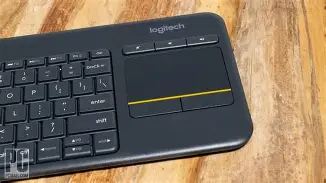
The K400 Plus favors a compact footprint and simplicity. Its profile is low, keys are shallow and quiet, and the layout omits a separate numeric keypad to save space. The integrated touchpad sits to the right of the key area, intended for two-handed use: one hand types while the other gestures. Construction is primarily plastic with a matte finish; it feels lightweight and unobtrusive in a living-room environment.
Build quality is typical for an affordable consumer keyboard: nothing premium, but nothing fragile either. The keyboard is designed to live on a coffee table or lap rather than be the main workstation keyboard for a daily heavy-typing user.
Keyboard Feel and Typing Experience
Key travel is short and the switches are quiet, which suits casual typing and media control. For web browsing, entering passwords, or short email replies from the couch, the K400 Plus is comfortable enough. Heavy typists or those who write for hours each day will notice limitations: the compact layout and chiclet-style keys do not provide the tactile feedback or ergonomics of a dedicated desktop keyboard.
Key spacing and size are scaled to fit the compact body. Most users adapt quickly, but those with large hands may find some keys feel cramped. The lack of a numeric keypad is a trade-off—great for space saving, inconvenient for anyone who regularly enters numbers.
Touchpad Performance
The integrated touchpad is the product’s defining feature. It allows cursor control without a separate mouse, which is ideal for couch setups and media centers. The touchpad supports basic gestures such as single and two-finger scrolling and tap-to-click. For navigating a TV interface, streaming apps, or simple web pages, it’s more than adequate.
However, the touchpad is compact, and precision tasks (image editing, spreadsheet cell selection, or fine-grain cursor control) are less comfortable. Touchpad responsiveness is generally good for casual use, but it cannot replace a dedicated high-precision trackpad or external mouse in productivity scenarios.
Wireless Connectivity and Range
The K400 Plus uses a small USB wireless receiver and operates on a 2.4 GHz wireless link. Setup is largely plug-and-play: plug the receiver into an available USB port and the keyboard usually connects immediately without additional software. Range is suitable for a living room; users can expect normal operation from typical seating distances. Walls and interference from other 2.4 GHz devices can affect range and latency, but for media navigation the experience is typically stable.
Discover deals on Electronics — updated daily.
See Deals →Battery Life and Power
A major selling point is long battery life. On typical conservative usage patterns—occasional typing and media navigation—battery longevity stretches for months on standard replaceable batteries. That makes it convenient for living-room use where frequent charging would be an annoyance.
Some users prefer rechargeable solutions; the K400 Plus is built around replaceable cells. This is a boon if one wants immediate battery swaps, but less attractive for those who prefer a single rechargeable unit and a built-in USB charging port.
Compatibility and Software
Compatibility covers the essentials: Windows and many smart TV platforms. It also works with Chrome OS and many Android-based streaming devices. Mac users can use the keyboard, but key labels and shortcuts may not map exactly to macOS conventions, and some media keys may behave differently.
Most users will get by without installing any drivers. Where customization is desired—remapping keys or customizing gesture behavior—software support for the K400 Plus is limited compared with higher-end models. Buyers who expect deep customization should consider keyboards with companion apps and richer software ecosystems.
Durability and Longevity
For passive, light-duty use the K400 Plus is durable. It’s not designed as an industrial device and will not match the lifespan of premium mechanical keyboards. The plastic chassis and keys are sufficient for everyday living-room use but users should manage expectations about long-term heavy use. Spills and drops may cause irreversible damage, as with most consumer keyboards.
Real-World Use Cases
- Home theater PC (HTPC) or media center control: Quick navigation of streaming apps, search entry, and media control without getting up from the couch.
- Smart TV and streaming stick navigation: Easier typing and cursor control compared with TV remotes.
- Casual browsing and email on a living-room or secondary setup.
- Presentations or meeting rooms where a small, self-contained input device is preferred over a mouse.
- Light-duty kiosks or public displays where simple navigation is needed and the device is not subject to heavy typing.
Pros & Cons
Pros
- Integrated touchpad: Eliminates the need for a separate mouse for casual navigation.
- Compact footprint: Easy to use on a lap or coffee table; saves space compared with full-sized keyboards.
- Long battery life: Runs on replaceable batteries for extended periods between changes.
- Plug-and-play simplicity: Easy to set up with a tiny USB receiver—no complex pairing for many devices.
- Quiet typing: Low-profile, low-noise keys suit shared living spaces.
Cons
- Not for heavy typing: Short key travel and compact layout make it less comfortable for sustained typing work.
- Small touchpad: Limits precision for productivity tasks and fine cursor control.
- No backlighting: Using it in dimly lit rooms requires external lighting—uncomfortable for some living-room environments.
- Limited customization: Minimal software support for remapping keys or adjusting gestures.
- Replaceable batteries only: No integrated rechargeable battery or USB charging, which some users may prefer.
Comparison Table
| Feature | K400 Plus | Backlit Living-Room Option (example) | Premium Compact Keyboard (example) | All-in-One Media Keyboard (example) |
|---|---|---|---|---|
| Integrated Touchpad | Yes | Yes | Some models, optional | Yes |
| Backlight | No | Yes | Varies (often yes) | No |
| Battery Type | Replaceable batteries | Rechargeable | Rechargeable | Replaceable batteries |
| Best Use | Living-room media and casual use | Living-room use in low light | Desk-first productivity | Budget media navigation |
| Customization Software | Limited | Moderate | Extensive | Limited |
| Price Tier | Budget to mid | Mid | Premium | Budget |
Buying Guide: Is the K400 Plus Right for You?
1. Identify the Primary Use
Buyers should ask whether the device will be the primary typing tool or a convenience device for a secondary setup. The K400 Plus excels as a secondary or casual-use input for a living room, smart TV, or media center. It is less suited to daily heavy typing tasks or professional writing.
2. Consider Typing Comfort and Ergonomics
If typing comfort and feedback are priorities, evaluate alternatives. A compact mechanical keyboard or a premium low-profile keyboard without an integrated touchpad may provide a much better typing experience. If couch-based light typing is the goal, the K400 Plus will usually be comfortable enough.
3. Touchpad Needs vs. Precision
Think about how often precise cursor control will be required. For web browsing, streaming navigation, and simple productivity, the K400 Plus touchpad is practical. For photo editing, spreadsheet work, or CAD, an external mouse or a more precise touchpad is advisable.
Looking for the best Electronics deals on Amazon?
See Deals →4. Lighting Conditions
Because the K400 Plus lacks backlighting, it performs best in rooms with sufficient ambient light. If one expects to use the keyboard in dimly lit or dark environments, consider a backlit alternative or ensure good ambient lighting.
5. Power Preferences
Some users prefer replaceable batteries (convenience of quick swaps), while others prefer rechargeable units (no recurring battery purchases). Decide whether replaceable-cell operation fits the intended use. If a rechargeable, single-cable experience is important, a different model may be a better fit.
6. Compatibility Checklist
- Confirm the target device supports USB wireless receivers (some smart TVs and streaming sticks expose a USB port; others may not).
- For Mac users, check that key mappings are acceptable and understand that some special keys may behave differently.
- For Linux users, basic functionality is usually present via standard HID drivers, but advanced features and gestures may be limited.
7. Software and Feature Tradeoffs
Buyers who want per-key remapping, custom macros, or deep gesture configuration should look beyond budget living-room keyboards. The K400 Plus prioritizes simplicity over configurability.
8. Alternatives to Consider
Consider these alternatives depending on priorities:
- If backlighting and rechargeable battery are essential, look at living-room keyboards that include illumination and USB charging.
- If typing speed and comfort are priorities, consider a compact desktop keyboard without a touchpad and pair it with a small wireless mouse or separate trackpad.
- If budget is the primary concern but a similar all-in-one form factor is wanted, other mass-market media keyboards offer similar functionality—compare build quality and user reviews.
Practical Buying Checklist
- Will this primarily be used in the living room or as a daily driver?
- Is an integrated touchpad more valuable than a full-sized keypad?
- Will the device be used in low light? If yes, is backlight needed?
- Does the target device have a free USB port for the receiver?
- Is replaceable battery operation acceptable, or is rechargeable preferred?
- Are there specific OS compatibility or key-mapping requirements?
Conclusion
The K400 Plus is a sensible choice for a clear set of users: those who want an inexpensive, simple, and compact input device for media centers, smart TVs, and casual living-room computing. It shines when the requirements are light typing, easy navigation from the couch, quiet operation, and long intervals between battery changes.
However, it is not a universal solution. Buyers who need precision pointer control, extensive customization, backlighting, or a keyboard that will endure heavy daily typing should carefully weigh alternatives. The trade-offs—small touchpad, compact layout, non-rechargeable battery approach, and modest software support—mean the K400 Plus is best treated as a convenience device rather than a replacement for a primary workstation keyboard.
In short: don’t buy the K400 Plus unless its strengths match the intended use. For the right user—someone who values simplicity and couch-friendly navigation—it’s a practical and unobtrusive tool. For anyone who needs power, precision, or advanced features, it’s worth exploring other options before making a purchase decision.